Friday, June 12, 2015

Common Configuration Errors / Exceptions


Error / Exception 1 ::
While configuring for my first sample JPA application , I faced many weird errors and exceptions but that was all due to my inexperience on this side, I have few documented below which could help other developers 

a) Internal Exception: java.sql.SQLException: Io exception: NL Exception was generated

Possible Cause:: Check your jdbc url in the Persistence.xml file under Meta-Inf configuration 

I had :: jdbc:oracle:thin://host:1521/dbname3t;create=true for my JPA configuration

It should have been :: jdbc:oracle:thin:@host:1521:dbname3t


b) persistence, oracle thin, ORA-12505, TNS listener does not currently know of SID

I was getting  org.eclipse.persistence.exceptions.DatabaseException ORA-12505, TNS:listener does not currently know of SID given in connect descriptor

While trying to fix it I found the URL configured in the persistance.xml was incorrect 

I had :: jdbc:oracle:thin://host:1521/dbname3t;create=true for my JPA configuration

It should have been :: jdbc:oracle:thin:@host:1521:dbname3t

c) javax.persistence.PersistenceException: No Persistence provider for EntityManager named         "TestJPAEntity"

In JPA a database connection is represented by the EntityManager interface. In order to access and work with an ObjectDB database we need an EntityManager instance. If there is any problem in locating the Entitymanager defined in your client/service class then this error will be thrown

You can update the persistence.xml or your testClient/Service java class to have same name
refer below sample code for persistence Unit Name and name in your java class.

Sample Persistence XML ::
persistence.xml
<?xml version="1.0" encoding="UTF-8"?>
<persistence version="2.0" xmlns="http://java.sun.com/xml/ns/persistence" xmlns:xsi="http://www.w3.org/2001/XMLSchema-instance" xsi:schemaLocation="http://java.sun.com/xml/ns/persistence http://java.sun.com/xml/ns/persistence/persistence_2_0.xsd">
<persistence-unit name="JPATestPaymentCreation">
<provider>org.eclipse.persistence.jpa.PersistenceProvider</provider>
          <class>payments.Payment</class>
          <properties>
               <property name="javax.persistence.jdbc.driver"    
                              value="oracle.jdbc.driver.OracleDriver" />
               <property name="javax.persistence.jdbc.url"
                    value="jdbc:oracle:thin:@dbhost03:1521:dbName3t" />
               <property name="javax.persistence.jdbc.user" value="online_service" />
               <property name="javax.persistence.jdbc.password" value="EW66P#$A" />
          </properties>
</persistence-unit>

</persistence>

TestJPAJava Class

public class TestInsertPaymentViaJPA {
private static final String PERSISTENCE_UNIT_NAME = "JPATestPaymentCreation";
 private static EntityManagerFactory factory;

 public static void main(String[] args) {
factory = Persistence.createEntityManagerFactory(PERSISTENCE_UNIT_NAME);
        EntityManager em = factory.createEntityManager();       
       // Read the existing entries and write to console
          Query q = em.createQuery("SELECT emp FROM Employee emp");    
         List<Employee> empList = q.getResultList();
         for (Employee emp : empList) {
              System.out.println(emp.getEmpNameId());
         }
         System.out.println("Size: " + empList.size());
            em.close();
}
}

c) java.lang.ClassCastException: org.eclipse.persistence.jpa.PersistenceProvider cannot be cast to javax.persistence.spi.PersistenceProvider

If you are using Eclipselink as your persistence provider , then you could have faced this error , this is a run time error and could be due to following causes:
            i) The version of the Eclipselink and javax.persistence.xx jars are not compatible
            ii) If you are running your application on Tomcat and the jars in Tomcat/lib directory are of different   
               version then the ones you have packaged in your web application.
            iii) Another possible cause could be any other jar in your workspace or packaged WAR is causing conflict

I was having issues with below combinations ::
            persistence-api-1.0.2.jar and eclipselink.jar (1.0)
            persistence-api-1.0 and eclipselink(1.0)

I was able to make it work with :: javax.persistence-2.1.0 and eclipselink (eclipselink-2.1.0.v20100614-r7608)

d) While Configuring Maven in the local workspace , most of the developers get below issue initially
   Eclipse complains “Could not resolve archetype” 

Could not resolve archetype org.apache.maven.archetypes:maven-archetype-webapp:RELEASE from any of the configured repositories.

While analyzing this issue and going through multiple posts online I figured this is related to proxy settings in the settings conf file under 9C:\Users\anyUserProfile\.m2\settings.xml), even though I had included the proxy settings with correct User/Password to get the Maven schema validated the format was incorrect , see below 

For my network settings below proxy config did nt work ::
<proxies>
    <!-- proxy Specification for one proxy, to be used in connecting to the network.-->
    <proxy>
      <active>true</active>
      <protocol>http</protocol>
      <username>anyUser</username>
      <password>passxxx</password>
       <host>host.name.com/</host>
<port>80</port> 
    </proxy>

  </proxies>

So instead of above settings I replaced with below ::

<proxy>
  <id>optional</id> 
  <active>true</active> 
  <protocol>http</protocol> 
  <username /> 
  <password /> 
  <host>proxy.test.com</host> 
  <port>8080</port> 
  <nonProxyHosts>localhost,127.0.0.1</nonProxyHosts> 

  </proxy>

And this resolved my issue of Maven Project not getting created.
      
d) Missing [SEI] when generating artifacts with WSGEN
     
    I faced this error while generating the artifacts for my Service implementation, which      
    needed to be exposed as a WebService.

    I tried following command on command prompt to generate my classes :
                         wsgen -verbose -cp . com.test.ws.EchoService -wsdl

    This throws me below error : WSGEN [options] <SEI
    
    and the reason being the utility not able to reach out or find the SEI Service Implementation       class for which we might want to write a client.

    What is happening here is the option " -cp " will set the classpath and try to retrieve or          resolve the EchoService class location according your classpath so in my case it was build/classes hence this makes it looks as ::

build/classes/com/test/ws/EchoService but the actual path is ::  C:\Users\EchoWebServiceExample\build\classes and then the package so it should be

wsgen -cp C:\Users\EchoWebServiceExample\build\classes  com.test.ws.EchoService -wsdl

    
e) Issue with new configuration on Eclipse to execute POM.xml to resolve all config metadata and execute the maven commands.

Failed to execute goal org.apache.maven.plugins:maven-compiler-plugin:2.3.2:compile 

Issue Faced: Error " WARNING: Error injecting: org.apache.maven.plugin.CompilerMojo
**java.lang.NoClassDefFoundError: org/codehaus/plexus/compiler/CompilerException**

Actually my JAVA_HOME was pointing to JRE_HOME , I found out when I executed this with below command
 mvn clean install -X

Java version: 1.7.0_79, vendor: Oracle Corporation 
Java home: C:\Program Files\Java\jre7

To fix this in eclipse I updated my CLASSPATH Variables under Eclipse -> Preferences -> Java -> Build Path - CLASSPATh VARIABLES to have a new entry as JAVA_HOME and pointed it to my JDK home it worked perfectly fine

f) Issue in building Web Application in Eclipse via inbuilt Maven plugin

JDK's tools.jar was not found in C:\Program Files\Java\lib\tools.jar. Usually this means you are running JRE, not JDK

Go to Preferences/Java/Installed JREs and add one more location as "C:\Program Files\Java\jdk1.7.0_7 or something like below you can update existing JRE location to point to JRE under your JDK as I removed the one for C:\Program Files\Java\jre7 and added C:\Program Files\Java\jdk1.7.0_79\jre
As you can see, the path C:\Program Files\Java\jre7\..\lib\tools.jar only makes sense if the first part (til the /..) is replaced by C:\Program Files\Java\jdk1.7.0_79\jre.


Tuesday, June 2, 2015

Publishing WebService using Axis2

Publishing REST ful WebService using Axis2


WSDL 2.0 HTTP Binding defines a way to implement REST (Representational State Transfer) with Web services. Axis2 implements the most defined HTTP binding specification. REST Web services are a reduced subset of the usual Web service stack.
  1. REST Web services are Synchronous and Request Response in nature.
  2. When REST Web services are accessed via GET, the service and the operations are identified based on the URL. The parameters are assumed as parameters of the Web service. In this case, the GET based REST Web services support only simple types as arguments and it should adhere to the IRI style.
  3. POST based Web services do not need a SOAP Envelope or a SOAP Body. REST Web Services do not have Headers and the payload is sent directly.
Axis2 can be configured as a REST Container and can be used to send and receive RESTful Web service requests and responses. REST Web services can be accessed using HTTP GET and POST.

The sample explains how to write a Web service and Web service client with 
Apache Axis2 using XML based client APIs (Axis2's Primary APIs).

First of all we will have to set up the Axis2 WAR to set up our REST container so that once we are ready with our service implementation and we have our .aar file generated  , we can get this deployed as a service on Axis 2 container.

The .AAR file will have META-INF holding services.xml which will have service implementation details:
      a. Service Class -> The actual Java class file holding implementation
      b. operation name -> The actual method name

1. Deploy Axis2 War on the local set up, I deployed my axis2.war under web apps directory of tomcat server as below ::


Deployed Services will be available on the below location after we execute build and get .aar file generated::

http://localhost:8080/axis2/services/

2. Create a Simple WebService which will just echo any String passed to it
import org.apache.axiom.om.OMElement;
import org.apache.axis2.AxisFault;
import javax.xml.stream.XMLStreamException;
public class MyService {
    public OMElement echo(OMElement element) throws XMLStreamException {
        //Praparing the OMElement so that it can be attached to another OM Tree.
        //First the OMElement should be completely build in case it is not fully built and still
        //some of the xml is in the stream.
        element.build();
        //Secondly the OMElement should be detached from the current OMTree so that it can be attached
        //some other OM Tree. Once detached the OmTree will remove its connections to this OMElement.
        element.detach();
        return element;
    }
}

3.  Bundle in a Axis Archive file i.e .AAR file
     a. build.xml for Ant based build / aar file generation
   <project name="userguide1" default="generate.service">
    <property name="mainDir" value="../.."/>
    <property name="classes.dir" value="build/classes"/>
    <path id="axis.classpath">
        <fileset dir="../../lib">
            <include name="*.jar"/>
        </fileset>
        <pathelement location="build/userguide1.jar"/>
    </path>
    <mkdir dir="${basedir}/build/classes"/>
    <target name="run.client.all"
            depends="run.client.blocking">
    </target>
    <target name="compile">
    <mkdir dir="${classes.dir}" />
<javac srcdir="src" destdir="${classes.dir}">
<classpath refid="axis.classpath" />
</javac>
<jar destfile="build/userguide1.jar">
            <fileset dir="${classes.dir}">
                <include name="userguide1/**"/>
            </fileset>
        </jar>
    </target>
    
    <target name="generate.service" depends="compile">
            <jar destfile="build/MyService1.aar">
           <fileset dir="src/userguide/example1/">
               <include name="META-INF/**"/>
           </fileset>
           <fileset dir="${classes.dir}">
               <include name="userguide/example1/**/*.class"/>
           </fileset>
        </jar>
        <copy file="build/MyService1.aar" tofile="../../repository/services/MyService1.aar" overwrite="true"/>
    </target>
   <target name="run.client.blocking" depends="compile">
        <java classname="userguide.clients.EchoBlockingClient"
              classpathref="axis.classpath" fork="true">
            <jvmarg value="-Daxis2.repo=${mainDir}/repository"/>
    <jvmarg value="-Daxis2.xml=conf/axis2.xml"/>
        </java>
    </target>
    <target name="run.client">
<echo message="Please use the following ant targets to run the clients" />
<echo message="run.client.all  -  run all clients" />
    </target>
    <target name="clean">
<delete dir="build" />
    </target>
</project>

c. Execute ant / build.xml and get the MyService1.aar generated which will be using the below src code.

    i) services.xml
            <service name="MyService1">
                      <description>
                      This is a sample Web Service with an echo operations
                        </description>
                 <parameter name="ServiceClass">userguide.example1.MyService</parameter>
                <operation name="echo">
               <messageReceiver class="org.apache.axis2.receivers.RawXMLINOutMessageReceiver"/>
               <actionMapping>urn:echo</actionMapping>
               </operation>
             </service>

     ii) MyService.java

import org.apache.axiom.om.OMElement;
import org.apache.axis2.AxisFault;
import javax.xml.stream.XMLStreamException;

public class MyService {
    public OMElement echo(OMElement element) throws XMLStreamException {
        //Praparing the OMElement so that it can be attached to another OM Tree.
        //First the OMElement should be completely build in case it is not fully built and still
        //some of the xml is in the stream.
        element.build();
        //Secondly the OMElement should be detached from the current OMTree so that it can be attached
        //some other OM Tree. Once detached the OmTree will remove its connections to this OMElement.
        element.detach();
        return element;
    }
}

d. Once build is completed the generated MyService1.aar file will be placed fine in the services of Axis repository, if it does nt get hot deployed on the running Axis2 container which is hosted on any Tomcat server, then you can restart service by axis2server.bat

Once deployed the newly made service will be available under below location::
C:\Softwares\axis2-1.6.2\repository\services


e. Verify if the service is properly deployed:

http://localhost:8080/axis2/services/


d. Test the Service using REST based call via simple java class by hitting the URL ::
     http://localhost:8080/axis2/services/MyService1?wsdl
import javax.xml.namespace.QName;
import javax.xml.parsers.FactoryConfigurationError;
import javax.xml.stream.XMLOutputFactory;
import javax.xml.stream.XMLStreamException;
import javax.xml.stream.XMLStreamWriter;
import org.apache.axiom.om.OMAbstractFactory;
import org.apache.axiom.om.OMElement;
import org.apache.axiom.om.OMFactory;
import org.apache.axiom.om.OMNamespace;
import org.apache.axis2.AxisFault;
import org.apache.axis2.Constants;
import org.apache.axis2.addressing.EndpointReference;
import org.apache.axis2.client.Options;
import org.apache.axis2.client.ServiceClient;


public class RESTClient {

    private static String toEpr = "http://localhost:8080/axis2/services/MyService1?wsdl";
    
    @SuppressWarnings("deprecation")
public static void main(String[] args) throws AxisFault {

        Options options = new Options();
        options.setTo(new EndpointReference(toEpr));
        
        options.setProperty(Constants.Configuration.ENABLE_REST, Constants.VALUE_TRUE);

        ServiceClient sender = new ServiceClient();
        sender.engageModule(new QName(Constants.MODULE_ADDRESSING));
        sender.setOptions(options);
        OMElement result = sender.sendReceive(getPayload());

        try {
            XMLStreamWriter writer = XMLOutputFactory.newInstance().createXMLStreamWriter(System.out);
            result.serialize(writer);
            writer.flush();
        } catch (XMLStreamException e) {
            e.printStackTrace();
        } catch (FactoryConfigurationError e) {
            e.printStackTrace();
        }
    }
    private static OMElement getPayload() {
        OMFactory fac = OMAbstractFactory.getOMFactory();
        OMNamespace omNs = fac.createOMNamespace("http://example1.org/example1", "example1");
        OMElement method = fac.createOMElement("echo", omNs);
        OMElement value = fac.createOMElement("Text", omNs);
        value.addChild(fac.createOMText(value, "Axis2 Echo 2323232 String "));
        method.addChild(value);

        return method;
    }
}


And on execution we have the below response from Echo Service client

<example1:echo xmlns:example1="http://example1.org/example1">
<example1:Text>Axis2 Echo 2323232 String </example1:Text>
</example1:echo>

Friday, May 29, 2015

Creating Soap based Webservice Client using Spring-WS

Creating a Simple Web Service Client with JAX-WS using Spring WS

SOAP Web Services provide a platform agnostic integration mechanism that allows disparate systems to exchange data regardless of the platform they are running on. For example, SOAP web services are commonly used to integrate .NET applications with applications running on the Java platform. Almost all modern platforms and frameworks (Java, .Net, Ruby, PHP, etc)  

  This section shows how to build and deploy a simple web service client.

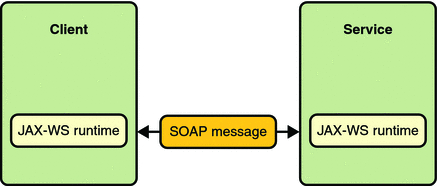
Communication between a JAX-WS Web Service and a Client

Diagram showing a client and web service communicating through a SOAP message.
                                                                                                                                                                                           
Spring Web Services aims to facilitate contract-first SOAP service development, allowing for the creation of flexible web services using one of the many ways to manipulate XML payloads. The product is based on Spring itself, which means you can use the Spring concepts such as dependency injection as an integral part of your Web service.

As the best way to define the data contract is xml schema hence we would consider that we have XSD provided with us and if not we can create an XSD from the sample documents conforming the requirements specs. Any good XML editor or Java IDE offers this functionality. Basically, these tools use some sample XML documents, and generate a schema from it that validates them all. The end result certainly needs to be polished up, but it's a great starting point. 

Consider we have the XSD with us, then we would need following:
  • Generate the WSDL from the xsd provided
  • Generate domain objects based on a WSDL (Considering WSDL is available else one needs to have a XSD shared by the WebService Producer)
  • Spring configuration - To inject WebServiceTemplate into the client class.
  • An implementation class - This class will be actually the webservice client
  • Calling the Web Service client 
++++++++++++++++++++++++++++++++++++++++++++++++++++++++++++++++++
1. Generating WSDL from the supplied XSD:
    
    a. We can use Spring to help us generate wsdl - we can configure spring-ws-servlet.xml in our Spring based web application we can have below "WSDL - Generator code"

<!-- WSDL Generator -->

    <bean id="anyservices"
        class="org.springframework.ws.wsdl.wsdl11.DefaultWsdl11Definition">
        <property name="createSoap12Binding" value="true" />
        <property name="schema">
            <bean class="org.springframework.xml.xsd.SimpleXsdSchema" p:xsd="classpath:ANY_XXX_XX.xsd"/>
        </property>
        <property name="portTypeName" value="ackEventPort" />
        <property name="locationUri"
            value="https://anyendpoint.domain.com:1234/ANY/AnyContext" />
    </bean>
   
    <sws:dynamic-wsdl id="anyservices"  portTypeName="ackEventPort" locationUri="/">
              <sws:xsd location="classpath:ANY_XXX_XX.xsd"/>
    </sws:dynamic-wsdl> 


b. Deploying the Spring Web App on any web container (I have used Tomcat 6)
following URL will generate the WSDL for you, consider the bean id as context (anyServices) and dynamic wsdl id as wsdl name anyservices.wsdl :
 
http://localhost:8080/ApplicationWAR/anyService/anyservices.wsdl


++++++++++++++++++++++++++++++++++++++++++++++++++++++++++++++++++++
If you want to validate the request / response against schema (xsd) , you can add the below in the spring ws servlet xml.

<!-- Schema validation -->
<bean id="validatingInterceptor"
   class="org.springframework.ws.soap.server.endpoint.interceptor.PayloadValidatingInterceptor">
            <property name="schemas">
                  <value>classpath:
ANY_XXX_XX.xsd</value>              
            </property>
            <property name="validateRequest" value="true" />
            <property name="validateResponse" value="true" />
        </bean>

+++++++++++++++++++++++++++++++++++++++++++++++++++++++++++++++++++++

 If we want to set the properties or as in read values from the properties file for some parameters we can set as below in the same spring ws servlet .xml file

<!-- @Start : Property Mappings for Application -->
    <bean id="account-property-mappings"
        class="org.springframework.beans.factory.config.PropertyPlaceholderConfigurer">
        <property name="properties" ref="account-configuration" />
    </bean>
    <!-- Composite configuration -->
    <bean id="account-configuration"
        class="org.springmodules.commons.configuration.CommonsConfigurationFactoryBean">
        <property name="configurations">
            <list>               
                <!-- pick from classpath -->
                <bean id="applicationProperties"
                    class="org.apache.commons.configuration.PropertiesConfiguration">
                    <constructor-arg type="java.io.File"
                        value="classpath:webservices.properties" />
                </bean>

                <!-- The db -->

<bean id="ackdatabaseConfiguration"                                                      class="org.apache.commons.configuration.DatabaseConfiguration">
                     <constructor-arg type="javax.sql.DataSource" ref="dataSource"/>
                     <constructor-arg index="1" value="PROPERTY"/>
                     <constructor-arg index="2" value="NAME"/>
                     <constructor-arg index="3" value="VALUE"/>
                 </bean>
            </list>
        </property>
    </bean>


 +++++++++++++++++++++++++++++++++++++++++++++++++++++++++++++++++++
2. Generating the Domain Objects from the WSDL generated from above step:

We can use wsimport utility of your JDK installed on your system and we have below command which will also generate the .java files at prescribed location::
 
wsimport -keep -s C:\SoapTestWSServiceSample\SVN_1.2\ApplicationsWAR\src -p org.utkarsh.ws.jaxb.generated C:\WSDLSample\TestWebService\accountservices.wsdl

This command will be generating the required domain objects which will then be used as a client to consume the web-service exposed and defined under the contract via .wsdl / .xsd file.


+++++++++++++++++++++++++++++++++++++++++++++++++++++++++
3. Writing the Implementation Service Client :

import java.math.BigDecimal;
import java.util.ArrayList;
import java.util.Date;
import java.util.List;

import org.slf4j.ext.XLogger;
import org.slf4j.ext.XLoggerFactory;
import org.springframework.beans.factory.annotation.Autowired;
import org.springframework.stereotype.Service;
import org.springframework.ws.client.core.WebServiceTemplate;
import com.pnc.lon.app.exception.WebServiceException;

@Service("wsClientServiceImpl")
public class WSClientServiceImpl {
   
    private static XLogger log = XLoggerFactory.getXLogger(WSClientServiceImpl.class);   
   
    @Autowired
    private WebServiceTemplate webServiceTemplateV2;
   
    public AnyModel validateAnyRequest(AnyModel anyModel) throws WebServiceException {
        ValidateAnyResponse validateAnyResponse =  null;
         try{
                validateAnyResponse = (ValidateAnyResponse) webServiceTemplateV2.marshalSendAndReceive(convertValidateAccountRequest("11456",anyModel));
               
                if(validateAnyResponse == null){
                    log.error("No Data found. Reponse is null");
                    return null;
                }
                //If response status is error, then throw WebServiceException
                    if(validateAnyResponse != null && (ApplicationConstants.ER.equals(validateAnyResponse.getResult().getStatus().toUpperCase()))){
                        //throw the exception to UI layer
                        WebServiceException wsException = new WebServiceException(validateAnyResponse.getResult().getStatus());
                        throw wsException;
                    }       
                           
            } catch (Exception e) {
                log.error("Exception thrown while calling validateAnyRequest() web service for MessageID : " + messageId + " : " + e.toString());
                WebServiceException wsException = new WebServiceException(e.getMessage() + "for MessageID : " + messageId);
                throw wsException;
            }
       
        return convertValidateAnyResponse(validateAnyResponse);
    }


    private ValidateAnyRequest convertValidateAccountRequest(String messageId,AnyModel anyModel) {
       
        ValidateAnyRequest validateAnyRequest = new ValidateAnyRequest();
       
        validateAnyRequest.setAccountCurrency(anyModel.getCurrency());
        validateAnyRequest.setAccountName(anyModel.getAccountName());
        validateAnyRequest.setAccountNumber(anyModel.getAccountNumber());
       
        return validateAnyRequest;
    }
   
    private AnyModel convertValidateResponse(ValidateAnyResponse response) {
        AnyModel anyModel =  new AnyModel();
       
        anyModel.setName(response.getAccountName());
        anyModel.setNumber(response.getAccountNumber());
       
        return anyModel;
    }

+++++++++++++++++++++++++++++++++++++++++++++++++++++++
The Spring documentation requires the client class to extend org.springframework.ws.client.core.support.WebServiceGatewaySupport, which is rather ugly. Instead, I prefer to have WebServiceTemplate injected into my client class.
 

The WebServiceTemplate bean is configured like this in the Service context or wherever you are performing the dependency injection :-
 
<!-- TEST -->
    <oxm:jaxb2-marshaller id="wsMarshallerV2" contextPath="com.pnc.lon.ws.jaxb.generated"/>
    <bean id="webServiceTemplateV2" class="org.springframework.ws.client.core.WebServiceTemplate">
        <property name="marshaller" ref="wsMarshallerV2"/>
        <property name="unmarshaller" ref="wsMarshallerV2"/>
        <property name="defaultUri" value="https://anyendpoint.domain.com:1234/ANY/AnyContext"/>
        <property name="messageSenders">
            <list>
                <ref bean="httpMsgSender"/>
            </list>
        </property>
         <property name="interceptors">
            <list>
                <ref bean="webSecurityInterceptor" />
            </list>
        </property>
    </bean>    


<!-- Configure Security as in user id password to connect to Web Service -->

<bean id="webSecurityInterceptor" class="org.springframework.ws.soap.security.wss4j.Wss4jSecurityInterceptor">
        <property name="securementMustUnderstand" value="true"/>
        <property name="securementUsernameTokenElements" value="Nonce Created"/>
        <property name="securementActions" value="UsernameToken"/>
        <property name="securementPasswordType" value="PasswordText"></property>
        <property name="securementUsername" value="serviceid"/>
        <property name="securementPassword" value="@passwdDV"/>
    </bean> 

 ++++++++++++++++++++++++++++++++++++++++++++++++++++++++++++++++++++
4. Invoking the Web Service Client :

a. Set the Request : 
           AnyModel anyModel = new AnyModel ();
             anyModel.setCurrency("USD");
             anyModel.setAccountNumber("3000003977");
             anyModel = wsClientServiceImpl.validateAnyRequest(false, anyModel) ;

             
 b. Printing any information from the response model object
            System.out.println(anyModel.getBalance());

+++++++++++++++++++++++++++++++++++++++++++++++++++++++++++++++++++++


Tuesday, May 26, 2015

How do I compare two enum in Java?

 How do I compare two enum in Java? Should I use == operator or equals() method? What is difference between comparing enum with == and equals() method are some of the tricky Java questions. Until you have solid knowledge of Enum in Java, It can be difficult to answer these question with confidence. By the way unlike comparing String in Java, you can use both == and equals() method to compare Enum, they will produce same result because equals() method of Java.lang.Enum internally uses == to compare enum in Java. Since every Enum in Java implicitly extends java.lang.Enum ,and since equals() method is declared final, there is no chance of overriding equals method in user defined enum. If you are not just checking whether two enum are equal or not, and rather interested in order of different instance of Enum, than you can use compareTo() method of enum to compare two enums. Java.lang.Enum implements Comparable interface and implements compareTo() method. Natural order of enum is defined by the order they are declared in Java code and same order is returned by ordinal() method.
 

 Comparing Enums with compareTo method
When we say comparing enum, it's not always checking if two enums are equal or not. Sometime you need to compare them for sorting or to arrange them in a particularly order. We know that we can compare objects using Comparable and Comparator in Java and enum is no different, though it provides additional convenience. Java.lang.Enum implements Comparable interface and it's compareTo() method compares only same type of enum. Also natural order of enum is the order in which they are declared in code. As shown on 10 examples of Enum in Java, same order is also maintained by ordinal() method of enum, which is used by EnumSet and EnumMap.

public final int compareTo(E o) {
        Enum other = (Enum)o;
        Enum self = this;
        if (self.getClass() != other.getClass() && // optimization
            self.getDeclaringClass() != other.getDeclaringClass())
            throw new ClassCastException();
        return self.ordinal - other.ordinal;
}


If you look last line, it's using ordinal to compare two enum in Java.

That's all on How to compare two enum in Java and difference between == and equals to compare two enums. Though using equals() to compare object is considered Java best practice, comparing Enum using == is better than using equals. Don't forget ordinal() and compareTo() methods, which is also key to get natural order of Enum during comparison.

Java Code to remove objects in a list iteration

// Handling removal of objects from a list using iterator,
// Removal of objects when amount is greater than balance in account

                        Iterator<Accounts> act_iterator = listAccounts.iterator();    
                        Collection<Accounts> accounts  =  null;
                        for (DueAmount dueAmt : listDueAmounts) {
                                while (act_iterator.hasNext()) {
                                   Accounts acctEnt = act_iterator.next();
                                     if (acctEnt.getAmount() < dueAmt.getAmount()) {
                                                    accounts.remove(acctEnt);
                                                }
                                 }
                        }